Independent product / 2026
Keepall
A visual library for
links, images, and files.
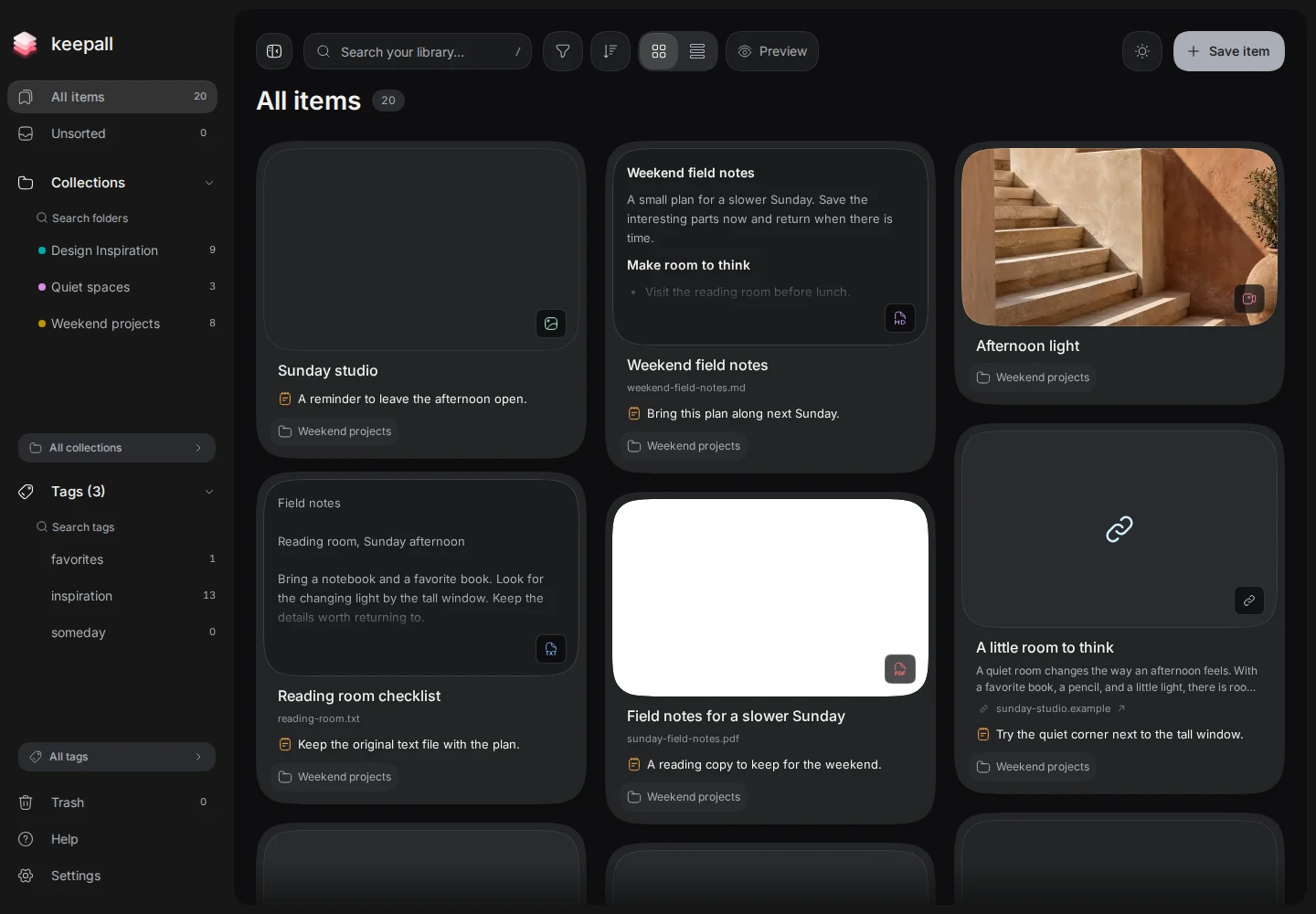
I built Keepall for people who recognize references by how they look. Link thumbnails and Open Graph images sit beside saved images and previews of Markdown, text, and PDF files.
The aim is to scan different types of content in one library, then open a larger preview when you need a closer look.

My role
I defined the product, designed its workflows, directed revisions, and reviewed the result. AI agents generated much of the implementation under my direction.
The product constraint
No account is required. The library stays in the browser. That removes signup, but backup and transfer must be explicit because data does not sync automatically. See the recovery flow.
Design decisions
Mixed-media cards
Show the content before opening it.
The grid puts link thumbnails, saved images, and document previews together. Users can scan their references visually before choosing one to open.
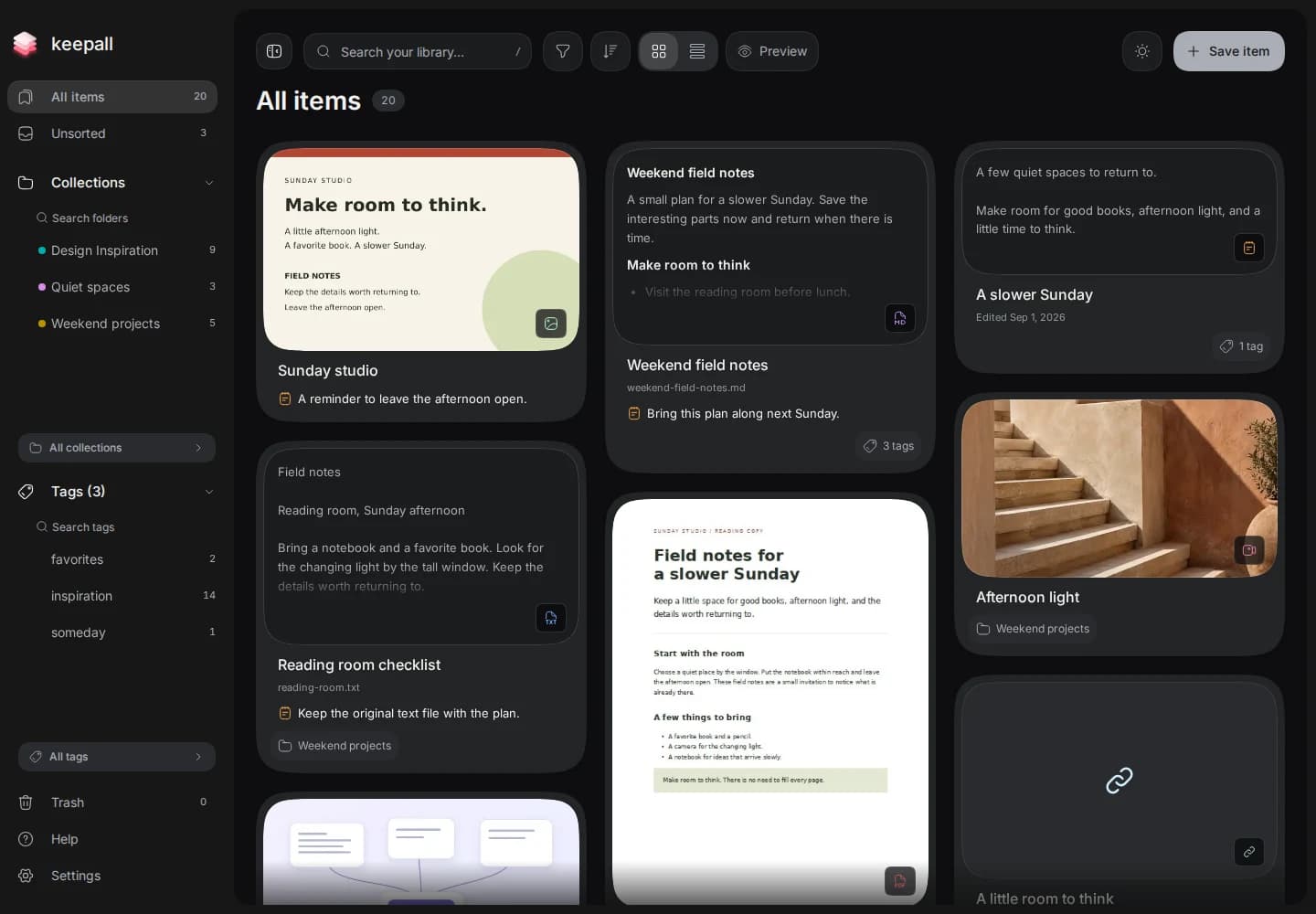
The actual library places an image, a Markdown document, and a note together. Each card gives its content a different amount of space.
Actual Keepall app capture · October 2026What was wrong
A single fixed card structure left gaps when an image had no title. It also blurred the difference between the source, the file, and a personal note.
What I changed
I gave each type a preview that fits its content. Links show a thumbnail or Open Graph image when available. Images keep their proportions. Markdown and text files show text, and PDFs show a page preview. Filenames, sources, and personal notes remain separate.
Why this choice
The previews help users recognize an item without opening each file. Collection and tag controls keep a shared position across content types. Untitled images do not reserve an empty heading.
I also rejected a list enclosed in another bordered panel. The list uses open rows with a small media slot, a title, and a secondary line. It offers a compact way to scan the same library.
Implementation notes and source
The content component selects a layout by item type. Untitled images omit the heading. Document and note previews use reading-card layouts. List view uses compact rows and favicon-only link thumbnails, so it does not need a large link image to render each row.
Quick Preview
Inspect a larger preview from the keyboard.
Press Space on an item to open Quick Preview. Use the arrow keys to move between items while the library stays behind the preview. Press Escape to close it, or Enter to open the full item.
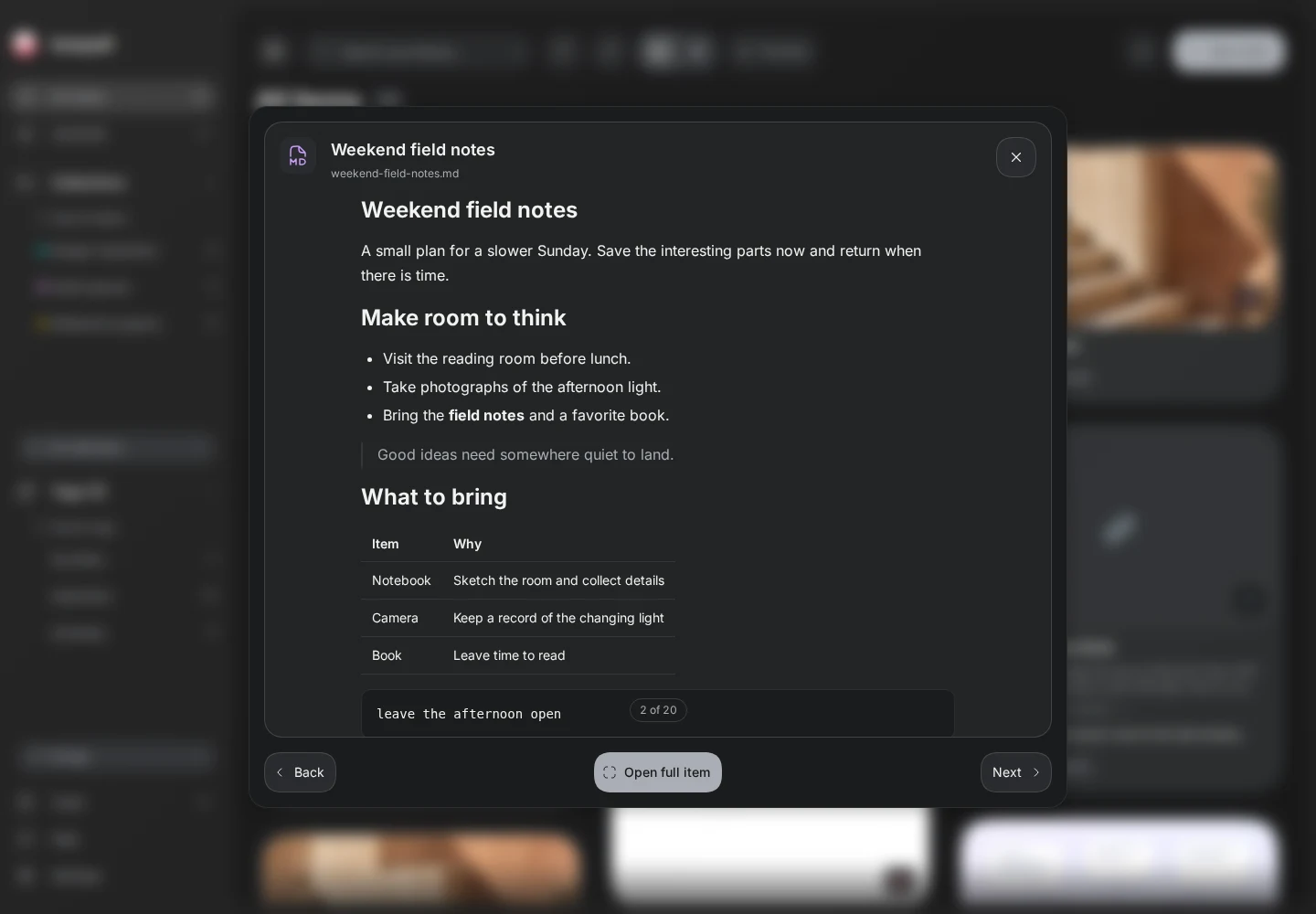
Preview keeps the library behind the document. Back and Next browse items. Open full item continues into the reader.
Actual Keepall app capture · October 2026What was wrong
I rejected a sequence that closed Preview, exposed the library, and then opened the full item. The extra step broke the connection between the views.
What I changed
I asked for the transition to start at the item already on screen. The source stays available while the full view opens.
Why this choice
Users can inspect an item at a larger size before deciding to open it. The recording shows a Markdown document moving from its card to Quick Preview and then to the full reader.
Back and Next also support pointer input. Text fields and video controls keep their own keyboard behavior. The up and down keys scroll when focus is inside scrollable preview content.
Implementation notes and source
The source and destination share the item identity. Keepall captures the source geometry before the route changes. Keyboard input and reduced motion skip the spatial transition; unsupported browsers still open the item.
Capture and Review
Use the same controls in Capture and Review.
Users can save an item without choosing a collection. These items stay in Unsorted for later review.
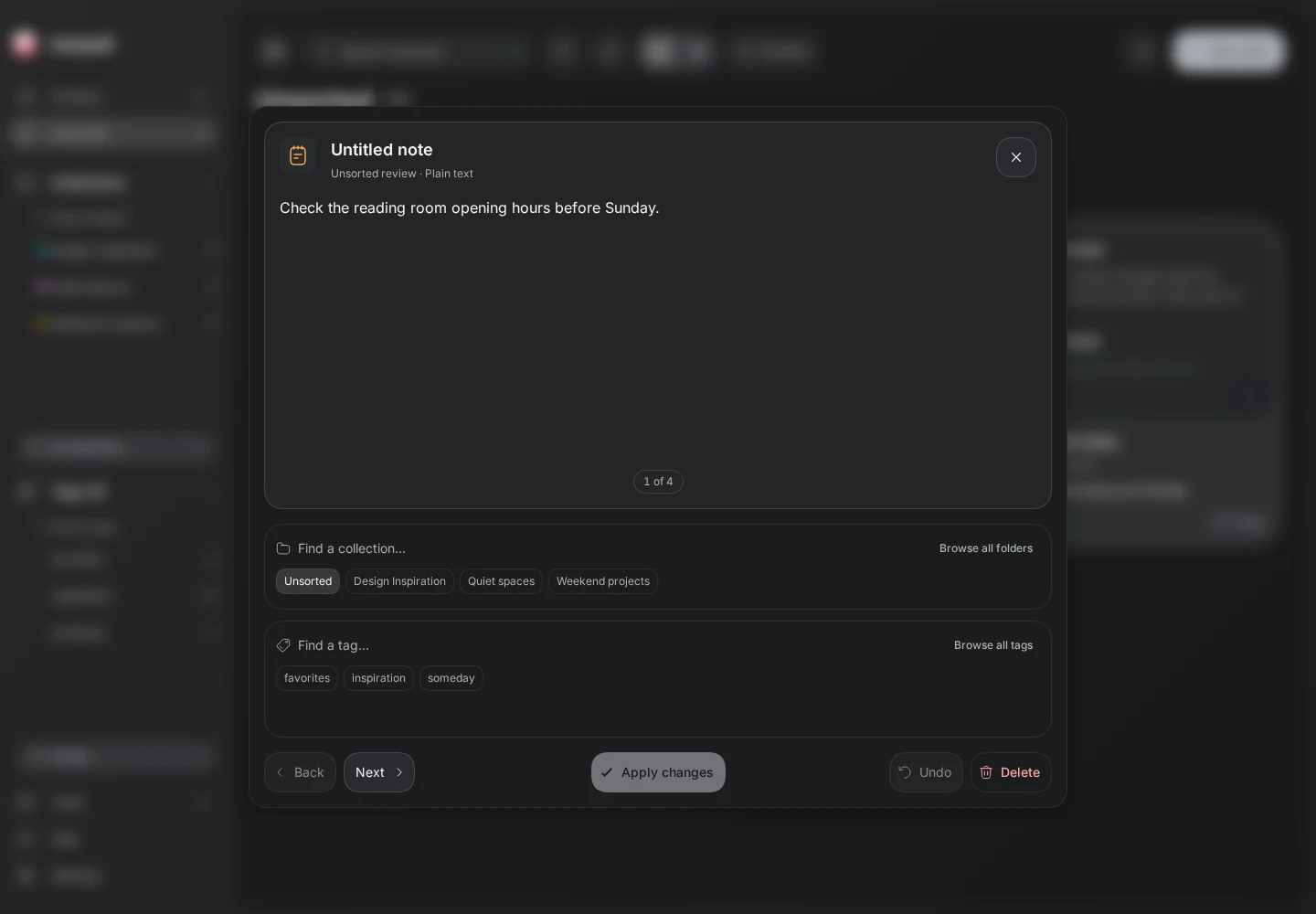
The saved note appears first in Review. The collection and tag controls sit below the content. Next browses without filing the item.
Actual Keepall app capture · October 2026What was wrong
Capture and Review used different organization controls. Review also moved as the item's tags changed, and Skip repeated what Next already did.
What I changed
I brought the collection and tag controls into one shared design. I reserved space for suggestions and the Create action, and kept Back and Next for browsing.
Why this choice
Next leaves the item in Unsorted. Tags apply immediately. Choosing a collection and pressing Apply changes files the item and advances the review. Undo can reverse that action while Review stays open.
Closing an unsaved Capture draft asks whether to discard it. Keep editing restores focus to the input, with the text intact.
Implementation notes and source
Capture and Review use CaptureOrgPanel, with a compact layout for Review. Suggestion rows are measured to fit the available width. Review keeps its queue while items change; undo records the action to reverse. Draft protection applies to Capture, not to every change in Review.
Image tools
Place image tools and results next to the image.
Text recognition and color extraction worked. Their placement still made the image workflow harder to follow.
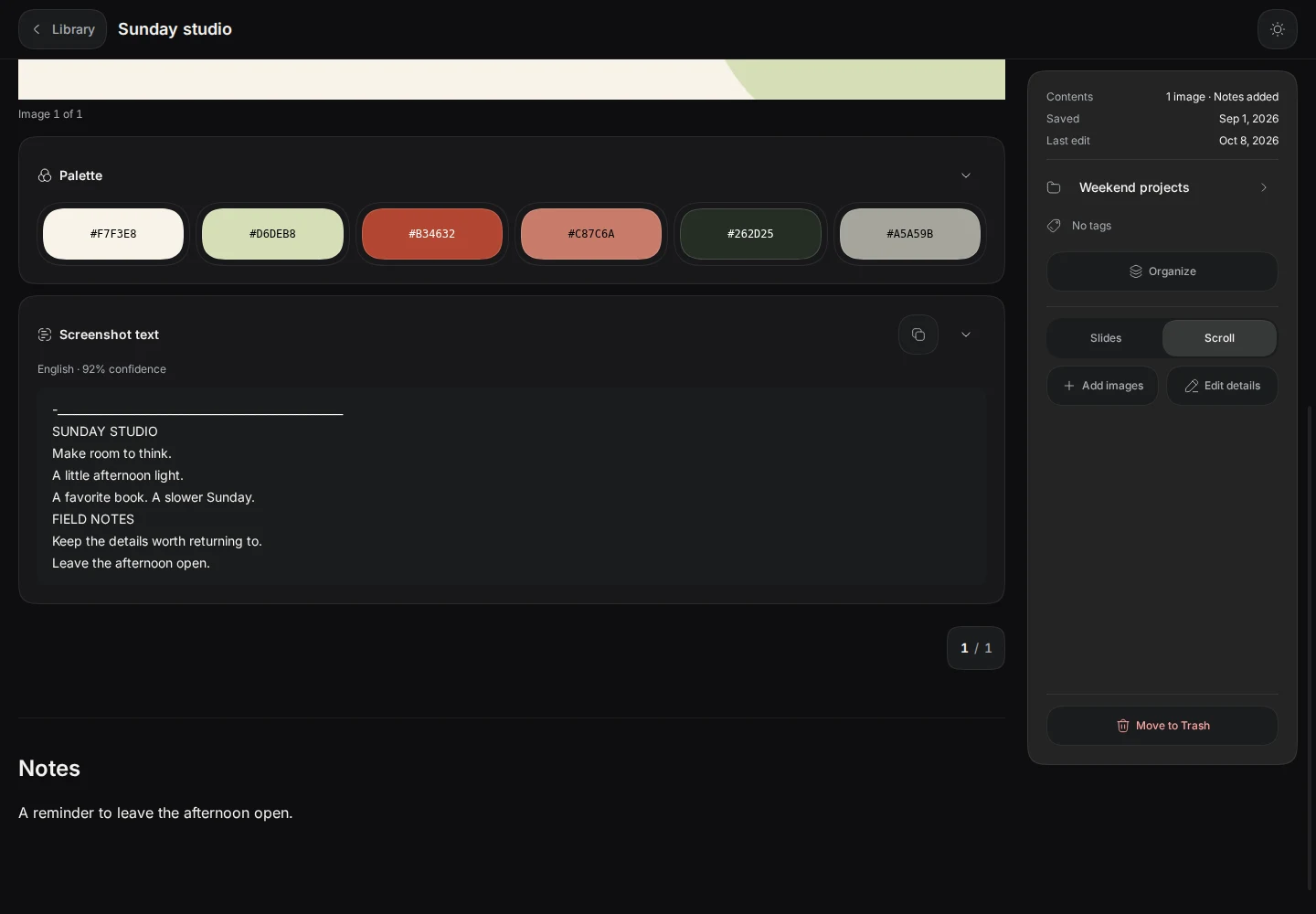
The palette and recognized text sit below the source image. Each result section can close independently.
Actual Keepall app capture · October 2026What was wrong
The first version put the tools in the right inspector. In a gallery, that separated the controls from the image they acted on.
What I changed
I moved the commands into each image's menu. I put the palette and recognized text below that image, before the personal notes.
Why this choice
Each image shows its own results. Click a color to copy its hex value, or open its menu to find nearby colors in the library.
I also replaced tall swatches with shorter capsules. The hex value and copy feedback stay together, and the capsules wrap on narrow screens.
Implementation notes and source
The image tools save results against the image asset. Color search uses OKLab distance. The search radius is a tuning choice, not a tested measure of visual similarity.
Search results
Explain search matches.
A saved image can match a search even when its title contains none of the search words.
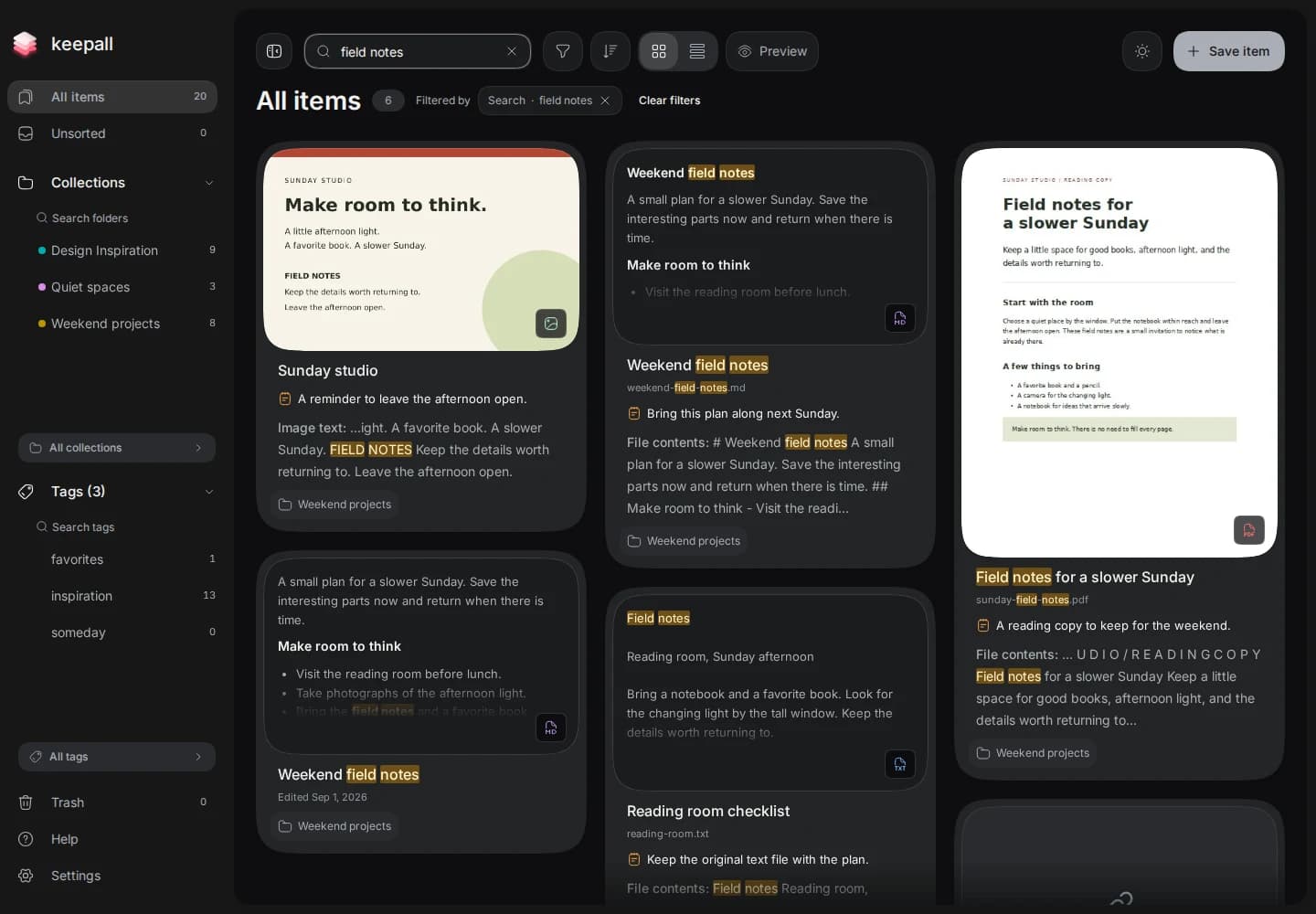
Field notes matches recognized image text. The supporting excerpt explains why Sunday studio appears in the results.
Actual Keepall app capture · October 2026What was wrong
A result called Sunday studio does not explain a search for field notes. The words can be inside the image, a document, or a personal note.
What I changed
I made the result show the matching excerpt and its source. In this example, Image text explains the match under the image card.
Why this choice
The title identifies the item. The excerpt shows the matching text. Highlighted terms connect the search query to the result.
I avoided repeating ordinary text matches that are already visible. Clipped words still need an excerpt. File-content matches keep their source label.
Implementation notes and source
The result checks the visible highlight bounds, including clipped ancestors. A resize can change whether an excerpt is needed. Finding the word in the DOM alone is not sufficient.
Sidebar resize
Update the card layout after resizing.
Resizing navigation also changes the space available to the library. Updating both on every pointer move made the cards shuffle.
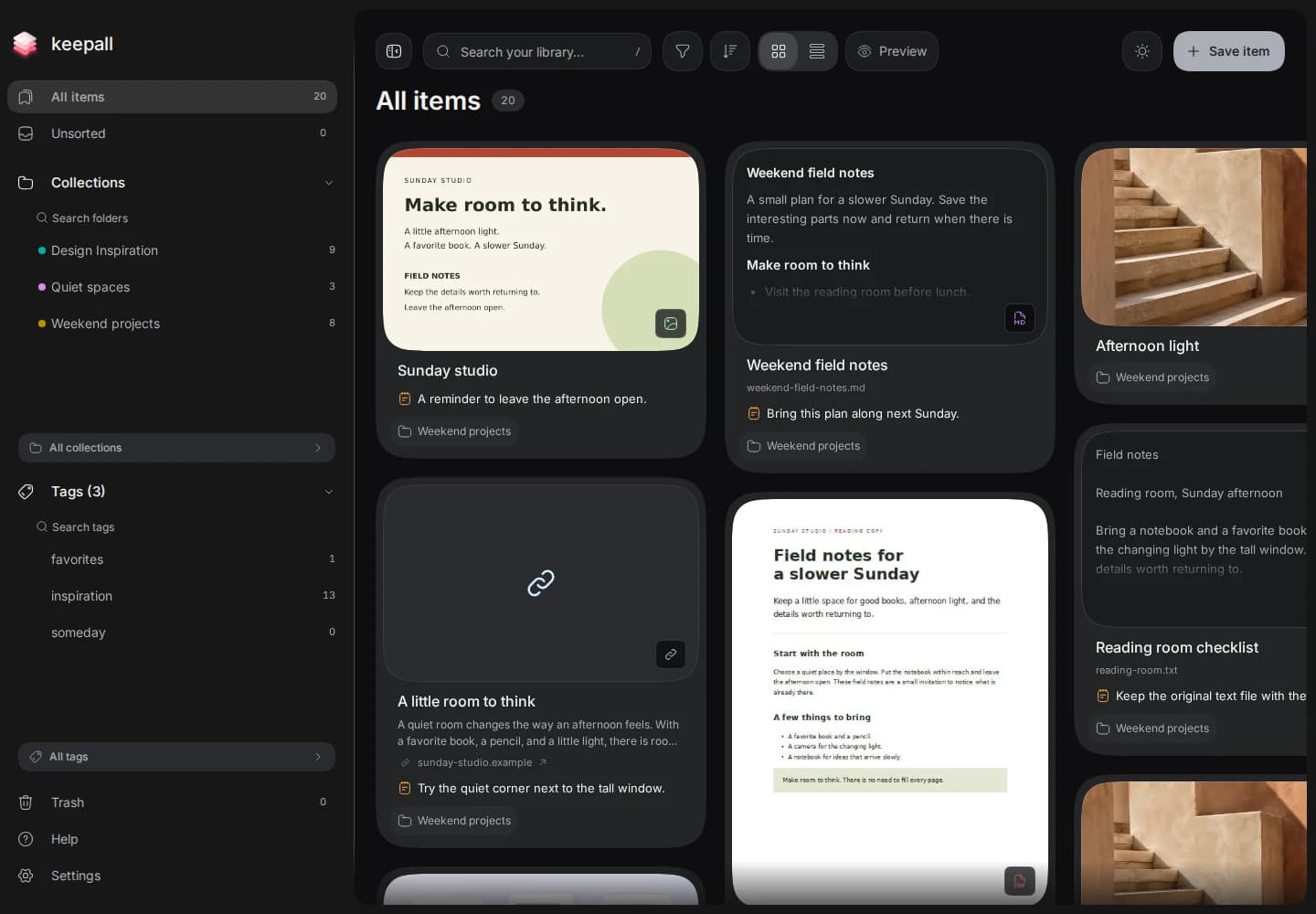
The sidebar is wider, but the first card keeps its width. The library waits to recalculate its columns.
Actual Keepall app capture · October 2026What was wrong
A masonry layout can keep recalculating while the sidebar changes width. The user then has to track moving cards during a simple resize.
What I changed
I held the library width during the drag. The sidebar follows the pointer, then the card layout updates when the drag ends.
Why this choice
The drag frame shows the original card width. The release frame shows the new layout. The library can move with the sidebar without repacking its cards at every step.
Escape restores the width from before the drag. A small movement threshold separates a click from a drag. The saved width also applies before hydration to avoid a jump on refresh.
Implementation notes and source
The resize handle freezes the library panel's measured width. Release removes that constraint. Cancellation restores the previous width and expansion state without saving the unfinished drag.
Backup and recovery
Explain storage and backup limits.
No account removes signup. It also means the browser holds the library. I made export and recovery explicit parts of the product.
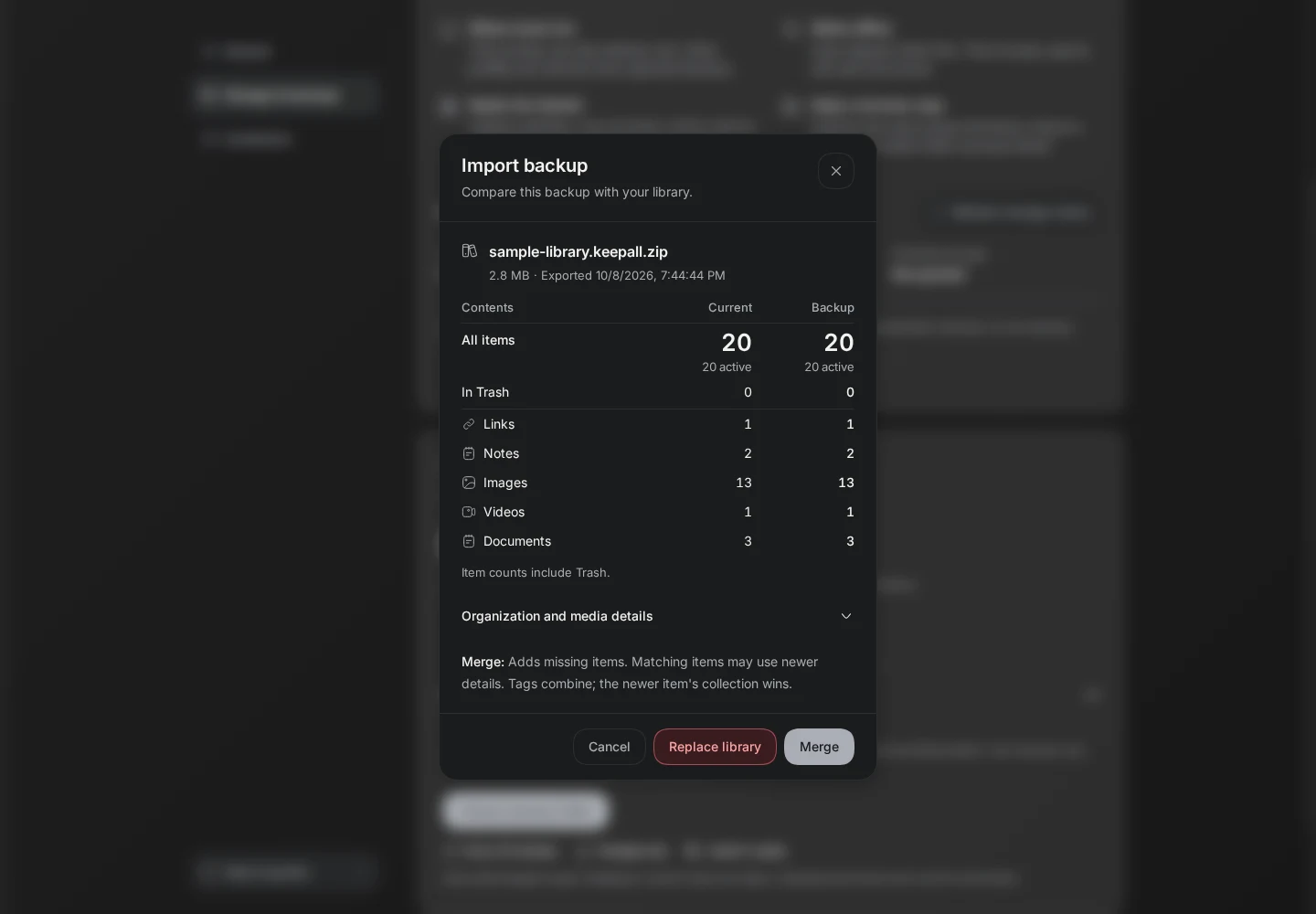
Import first compares the current library with the selected backup. This recording uses a fresh export of the sample library, so the counts match.
Actual Keepall app capture · October 2026Import compares the backup with the current library before making changes. Merge and Replace are separate choices. Replacement needs a second confirmation because it removes the current library.
Storage limits
Clearing site data can erase the library. A downloaded backup must stay outside the browser. Folder backups need a supported browser, folder permission, and the app running. If permission expires, Keepall offers a reconnect action.
Implementation notes and source
The export reads a consistent snapshot. Restore prepares the data before committing the library changes in one transaction. The recording shows the comparison and confirmation steps; it cancels before replacement.
Summary
Current result
Keepall shows different content types together so users can browse by appearance. Quick Preview gives them a larger view while keeping the library open.
Friends use the app and extension, and their early feedback has been useful. I have not measured a change in task completion time.
The earlier problems above come from the revision history. The recordings show the current app with sample data.